Deploy the baseline stack
Download the CloudFormation template:
cd ~/environment
curl -s https://raw.githubusercontent.com/brentley/appmeshworkshop/master/templates/appmesh-baseline.yml -o appmesh-baseline.yml
Deploy the CloudFormation stack:
# Define environment variable
IAM_ROLE=$(curl -s 169.254.169.254/latest/meta-data/iam/info | \
jq -r '.InstanceProfileArn' | cut -d'/' -f2)

#Check if the template is already deployed. If not, deploy it
CFN_TEMPLATE=$(aws cloudformation list-stacks | jq -c '.StackSummaries[].StackName | select( . == "appmesh-workshop" )')

if [ -z "$CFN_TEMPLATE" ]
then
echo "Deploying Cloudformation Template"
aws cloudformation deploy \
--template-file appmesh-baseline.yml \
--stack-name appmesh-workshop \
--capabilities CAPABILITY_IAM \
--parameter-overrides Cloud9IAMRole=$IAM_ROLE
else
echo "Template already deployed. Go ahead to the next chapter."
fi
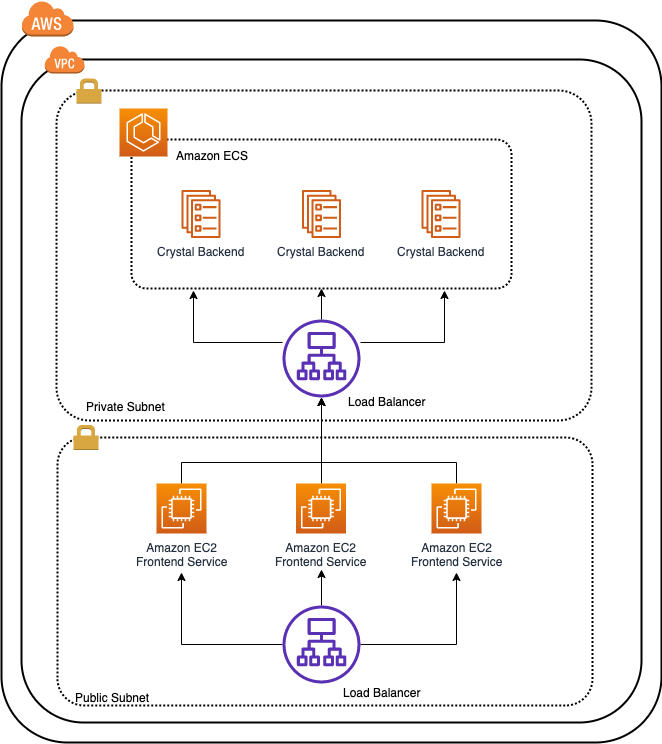
The CloudFormation template will launch the following:
- VPC with private and public subnets - including routes, NAT Gateways and an Internet Gateway
- VPC Endpoints to privately connect your VPC to AWS services
- An ECS cluster with no EC2 resources because we’re using Fargate
- ECR repositories for your container images
- A Launch Template and an Auto Scaling Group for your EC2 based services
- Two Application Load Balancers to front internal and external services
- A Private Hosted Zone for service discovery
This is the detailed application architecture: